Beam Optimzer
This module allows the user to input a range or a specific list of beam section properties, I, S, A, and weight density. The code will optimize the beam sections to minimize the section sizes while staying below or at a specified bending stress level.
Details (inputs, outputs, assumptions) Read once
Model summary
Inputs: Number of segments and their initial section properties. And segment loads.
Inputs: Nodal boundary conditions and nodal loads including the option of a pinned node.
Use: Clicking the Solve button will solve for the given configuration with no optimization.
Use: Clicking the Optimize Sections button will try to optimize the sections given the range of specific sections given in the Sections Catalog.
Useful hint 1: Starting with a wide range of sections can give the user some guidance on how the optimization will proceed. Then a specific set of sections can be tried. The range needs to be large enough to reach the target stress.
Useful hint 2: A configuration and results can be saved to a JSON file for reuse.
Examples
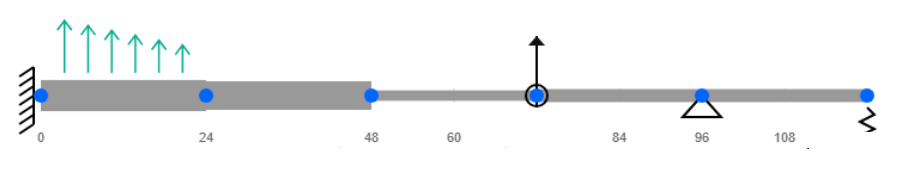
Beam segment optimization example. Click the image to enlarge.
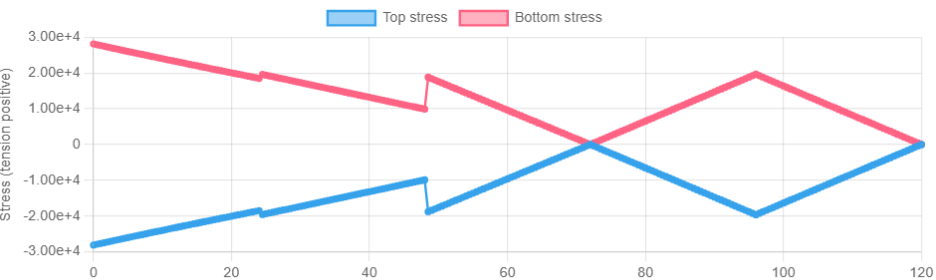
Optimized to the target stress limit.
Verify independently for safety-critical applications. See Terms.


